
Build the recommendation around the buyer
A planner should be able to open the link and recognize their program. Lead with a short welcome, explain the recommendation and choose an opening space that gives the buyer useful orientation.
For an illustrative annual meeting, include the proposed general session, breakouts, reception area and relevant guestrooms. A board dinner may need a different space and document set. Keep the recommendation concise enough to review, with supporting detail available where it matters.
The commercial proposal remains important. Rates, dates, concessions and terms should be handled through the hotel’s approved process. The Deal Room helps the buyer understand the physical product behind that offer.
What FOH Visual brings together
| Part of the experience | Purpose |
|---|---|
| Selected spaces and starting point | Guide the buyer into the relevant part of the hotel |
| 360 media and other visual content | Show the proposed property experience |
| Space facts and configurations | Explain recorded planning information and setup context |
| Floorplans and collateral | Keep supporting materials attached to the recommendation |
| Salesperson profile and custom message | Make the conversation personal and give the buyer a contact |
| Planning interactions and inquiries | Let the buyer compare, shortlist and ask about relevant spaces |
| Link controls and activity | Manage the shared experience and review engagement |
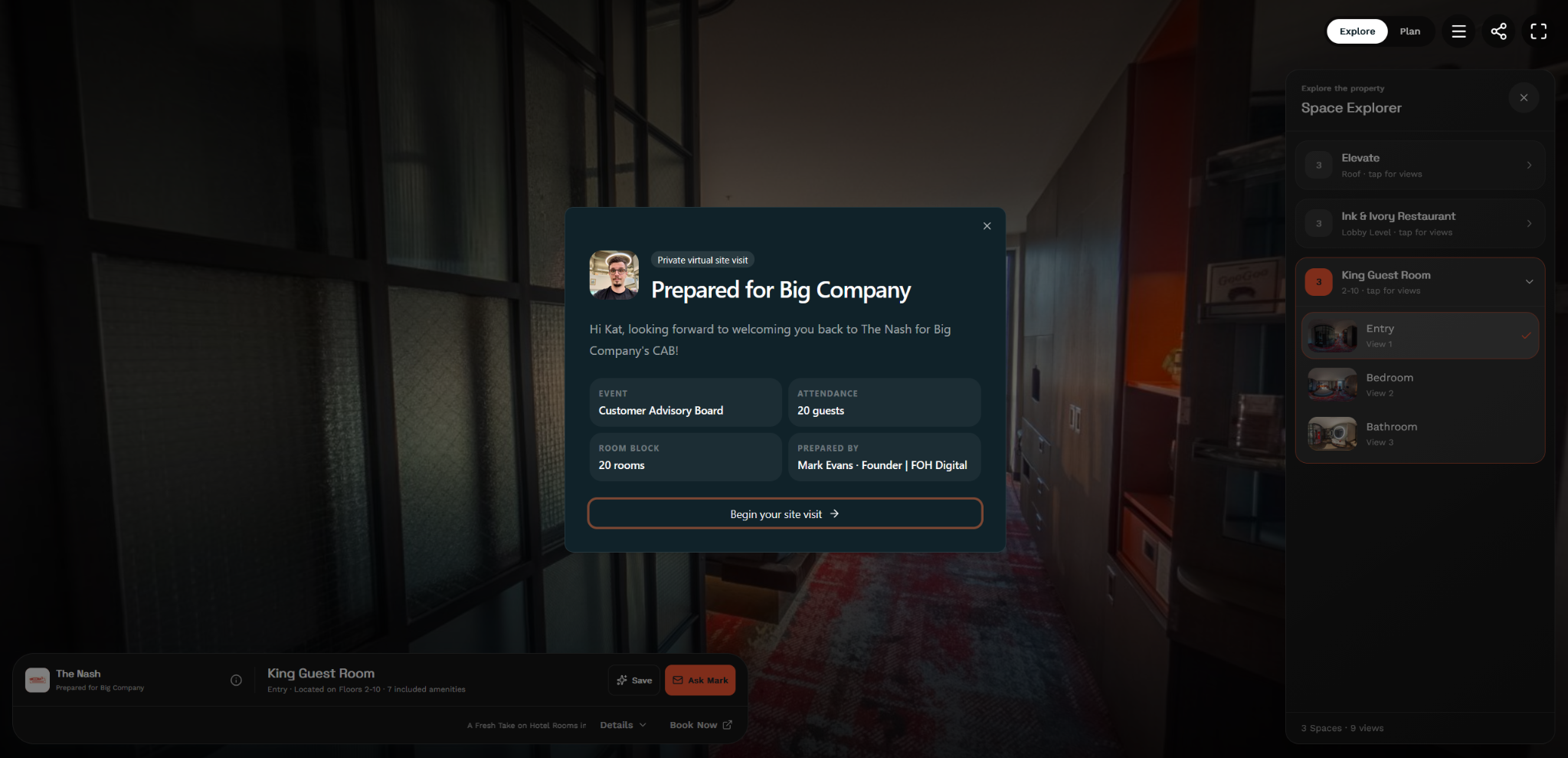
Keep the property ready. Tailor the recommendation.
The team builds from the hotel’s existing spaces and content. Sales Playlists can provide a reusable starting point for a segment or common program, then the salesperson chooses what belongs in the opportunity.
Review the opening view, selected configurations, supporting documents and welcome message before sharing. A reused presentation still needs an opportunity-specific review. Remove irrelevant spaces and confirm that the materials agree with the recommendation.
Help the buyer evaluate and return
A sales-shared Deal Room can include Plan mode with attendance and setup filters, comparison and a shortlist. Those interactions let the buyer work through the recommendation instead of browsing an entire hotel without direction.
Use a clear next step: review the shortlist together, resolve an AV question or arrange a focused site visit. Keep approval questions in the conversation; a saved space does not hold inventory.
Follow up with context
Hotel Sales shows engagement activity associated with the shared experience. Space views, returns, configuration activity, shortlist changes and inquiries can help the salesperson prepare a relevant follow-up.
If a buyer revisits the reception space, ask whether the guest count or event format has changed. Use the signal as context rather than announcing a prediction about their intentions.
Deal Rooms are unlisted buyer links with noindex metadata. They support expiration and revocation controls; they should be handled as shareable links rather than represented as confidential, authenticated document portals.
Start with a focused pilot
Choose a small set of sales users and a recurring inquiry type. Prepare a reliable property library, build one reusable Playlist and record how long a useful buyer response takes.
Compare adoption, preparation time, buyer questions and engagement across the pilot. FOH Visual is in a founding design-partner stage, with property-specific implementation and commercial proposals.
Review the buyer link before it goes out
- Open the link as a buyer and check the welcome, starting view and selected spaces.
- Match each room name and floorplan to the current proposal.
- Check menus, packages, downloads and the contact path on a phone.
- Review link-sharing expectations and expiration for the opportunity.
Use the content maintenance checklist for the source material and the software evaluation guide for the complete workflow.
Common questions
Is a Deal Room a contract or booking engine?
No. It presents the property and supports the sales conversation. Rates, inventory, contracts, payments and reservations remain in the hotel’s established process.
Can each buyer get different spaces and messaging?
Yes. FOH Visual Deal Rooms can contain selected spaces, a chosen starting point, salesperson identity, custom messaging and relevant collateral.
Are Deal Rooms intended for Google search?
No. FOH’s public property guides and unlisted buyer-specific Deal Rooms have separate discovery boundaries. Deal Rooms carry noindex metadata.
About this guide
Prepared by FOH Digital. Working examples are illustrative. Product descriptions reflect the reviewed scope; external sources are linked below.